
Resources in CMST
The Resources feature in CMST serves as a centralized document management system, enabling organizations to securely store, organize, and access consultancy-related files and documents. It enhances operational efficiency by ensuring that all important records are systematically maintained and easily retrievable.
Steps to Store Files and Folders
- Log in to CMST
- Navigate to the Resources section from the left panel
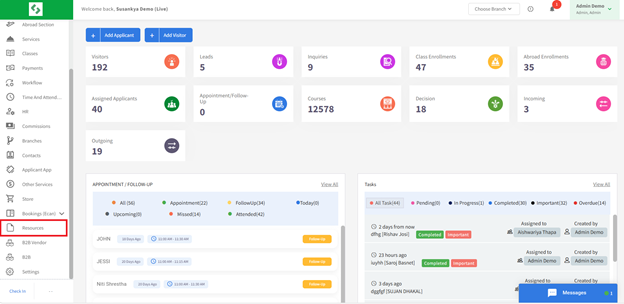
- Click on the Add Folder button (blue button)
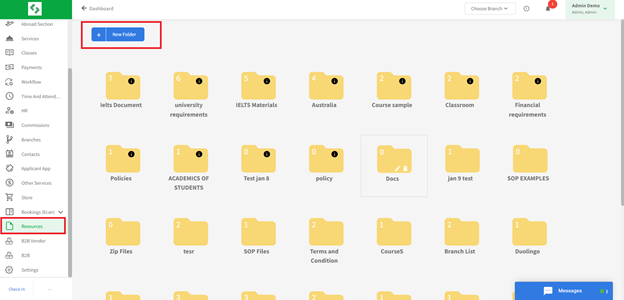
- Enter the folder name and upload the required files or documents
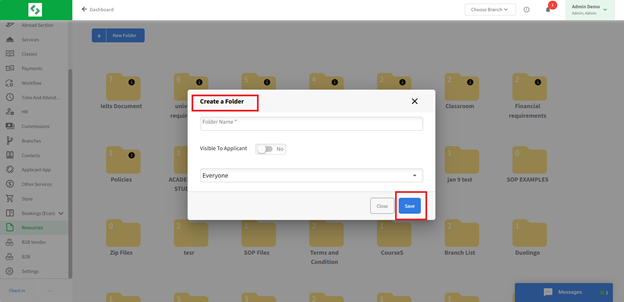
- Configure access permissions to control document visibility
- Save the changes
The Resources feature provides a secure and organized platform for document management, supporting improved collaboration, data security, and efficient workflow across the organization. It ensures appropriate access settings are applied to maintain confidentiality and data security and helps to organize files systematically to support efficient document management.